Engineering for an 80,000-Seat Arena: How We Tuned Verkada’s Video Pipeline for an NFL Stadium
Modern NFL stadiums are extremely demanding environments for video security cameras – tens of thousands of fans, extreme distances between the cameras and the crowd, constantly shifting lighting conditions, pyrotechnics, and more.
We’ve spent a lot of time working inside the control rooms across several major NFL venues, and one thing quickly became clear: default camera settings designed for enterprise campuses, hallways, or parking lots run into real limits when you throw them into an NFL stadium.
Recently, the security and IT leadership at a premier NFL franchise customer reached out to us with some specific challenges they were running into. Their SOC relies on Verkada PTZ cameras mounted high in the four corners of the stadium – what they call "the bowl." These cameras are zoomed all the way across the field into the opposite stands to spot issues in real time.
While the hundreds of Verkada cameras throughout the rest of their facility worked fine, the bowl-facing cameras were struggling with two main edge cases:
When operators digitally zoomed in from 250+ yards away to review an incident, the video was sometimes pixelated or writing in standard quality instead of high quality.
During concerts and night events with pyrotechnics and strobe lights, the cameras were constantly switching between day mode and night mode and losing focus.
Here is an under-the-hood look at how we dug into the firmware, streaming bitrates, and computer vision pipelines to figure out what was breaking and how to fix it.
Problem 1: Adaptive quality and motion detection at 250+ yards
To understand why the customer was getting pixelated footage from across the bowl, it helps to first understand how the SOC actually uses Verkada cameras during major events:
A physical security guard walking the concourse spots an altercation or someone vaping in the stands.
The guard radios the SOC with the exact location (e.g., Section 118, Row 14, Seat 6).
The SOC operator pulls up the corner PTZ covering that quadrant.
The operator digitally zooms into that specific row to identify who caused the problem.
Because digital zoom just crops and enlarges the pixels from the camera sensor, every pixel, compression artifact, and encoder decision matters.
Verkada cameras use an onboard hybrid-cloud architecture. To guarantee a customer gets their required 30, 60, etc. days of continuous retention without needing external NVRs, the camera runs an adaptive quality engine directly on its onboard solid-state drive.
Standard Quality (SQ): A continuous, lower-bitrate/lower-resolution stream written to disk 24/7 to guarantee the baseline retention window.
High Quality (HQ): A high-bitrate, full-resolution stream written to disk only when the onboard motion-detection algorithm detects activity in the frame.
Buffers: By default, whenever motion triggers HQ recording, the camera saves a 5-second pre-event buffer from RAM and continues recording for 5 seconds after the motion stops before decaying back to SQ.
Why it broke across the stadium
When a camera is mounted in an upper corner of a stadium aimed at the opposite end zone, an entire section of thousands of seats is compressed into a small section of the image sensor. A fan standing up, waving, or getting into an altercation 250 yards away only alters a cluster of roughly 4x4 pixels.
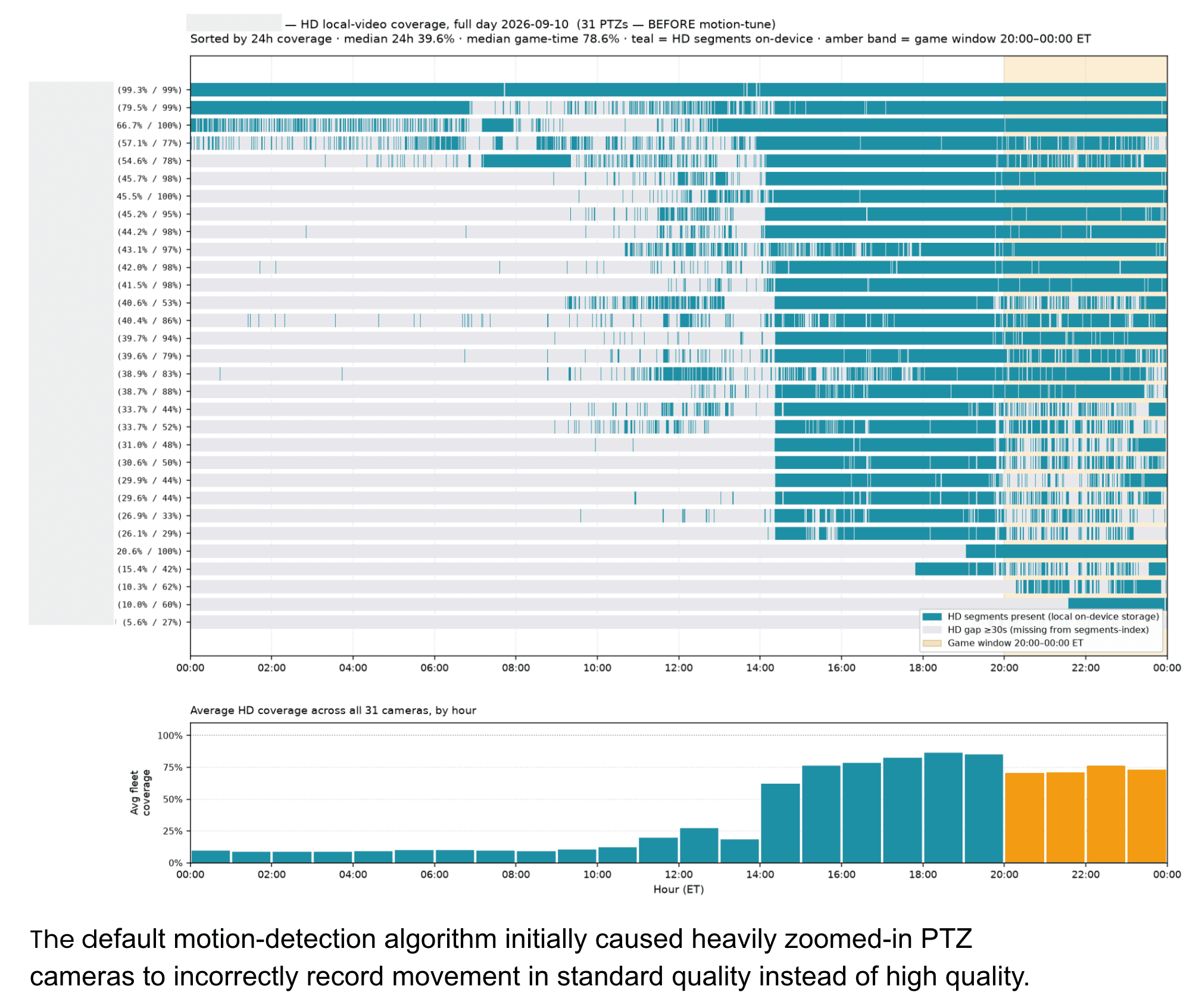
Our default motion-detection algorithm uses frame-to-frame pixel delta thresholds and macroblock vector shifts to detect movement while ignoring noise (like wind or digital sensor grain). Because the fans were so far away, the pixel shift was too small to pass the threshold; the camera's edge compute thought the scene was static.
As a result, even while an altercation was actively happening in the stands, the camera stayed in SQ mode, or bounced between SQ and HQ. When the SOC tried to digitally zoom in on an SQ clip, the footage was too blocky to positively identify anyone.
The fix: Lowering thresholds and extending the HQ tail
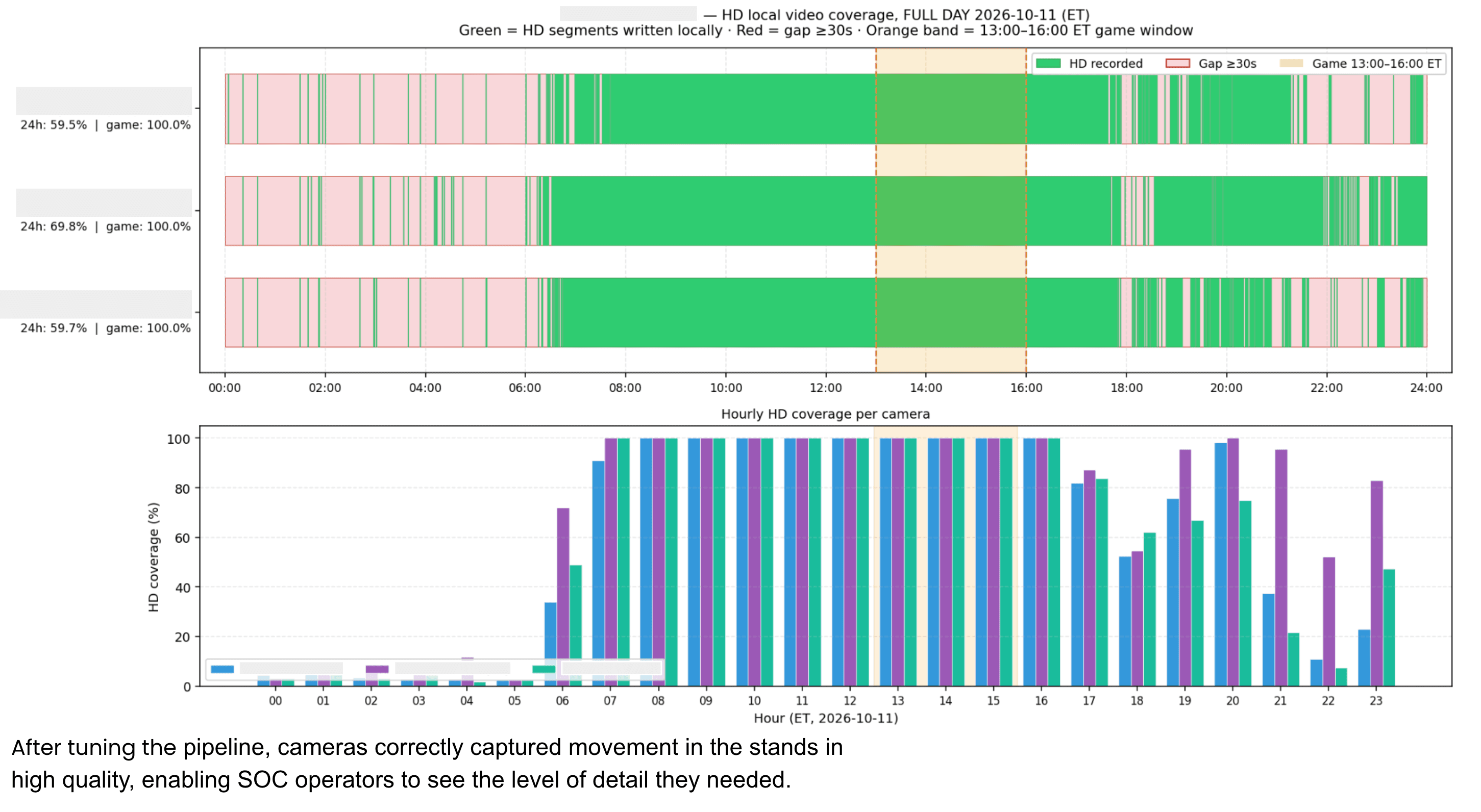
For the customer’s specific deployment, we decided to tackle this in two stages:
Immediate workaround: While we worked on long-term updates, our Support team wrote a custom script to forcefully toggle the cameras to record 100% in HQ during live events and gamedays, completely bypassing the motion trigger.
Algorithmic tuning: The customer gave us permission to pull actual gameday video into our image quality lab to re-train and test our offline motion models. Based on those tests, engineering made two core adjustments:
Lowered the motion detection threshold: We made the vector detection sensitive enough that even minute pixel variations across small bounding boxes trip the HQ write state.
Extended the pre/post event buffer from 5 seconds to 30 seconds: By bumping the decay window from 5s to 30s, any tiny, intermittent movement in the stands resets the timer, keeping the camera locked in HQ recording continuously throughout the event.
Even though writing continuous HQ video eats through local SSD storage faster, for the stadium SOC, having crystal-clear HQ footage of an active event for several days mattered much more than saving weeks of empty stadium footage.
Problem 2: Concert pyrotechnics and "IR thrash"
Most events at the stadium are daytime football games with consistent sunlight or night games under full stadium floodlights. But the venue also hosts massive music concerts, which introduced a tough edge case for camera sensors: rapid-fire pyrotechnics, moving stage spots, and crowd flashbulbs.
Security cameras typically automate their day/night switching using an onboard lux sensor. When ambient light drops below a certain lux threshold, the camera pulls an IR cut filter off the sensor, turns on its onboard IR illuminator LEDs, shifts into monochrome mode, and adjusts focus (because infrared light focuses at a slightly different focal plane than visible light).
When light returns, the camera places the mechanical IR cut filter back in front of the sensor, shuts off the IR LEDs, switches back to color, and refocuses for visible spectrum light.
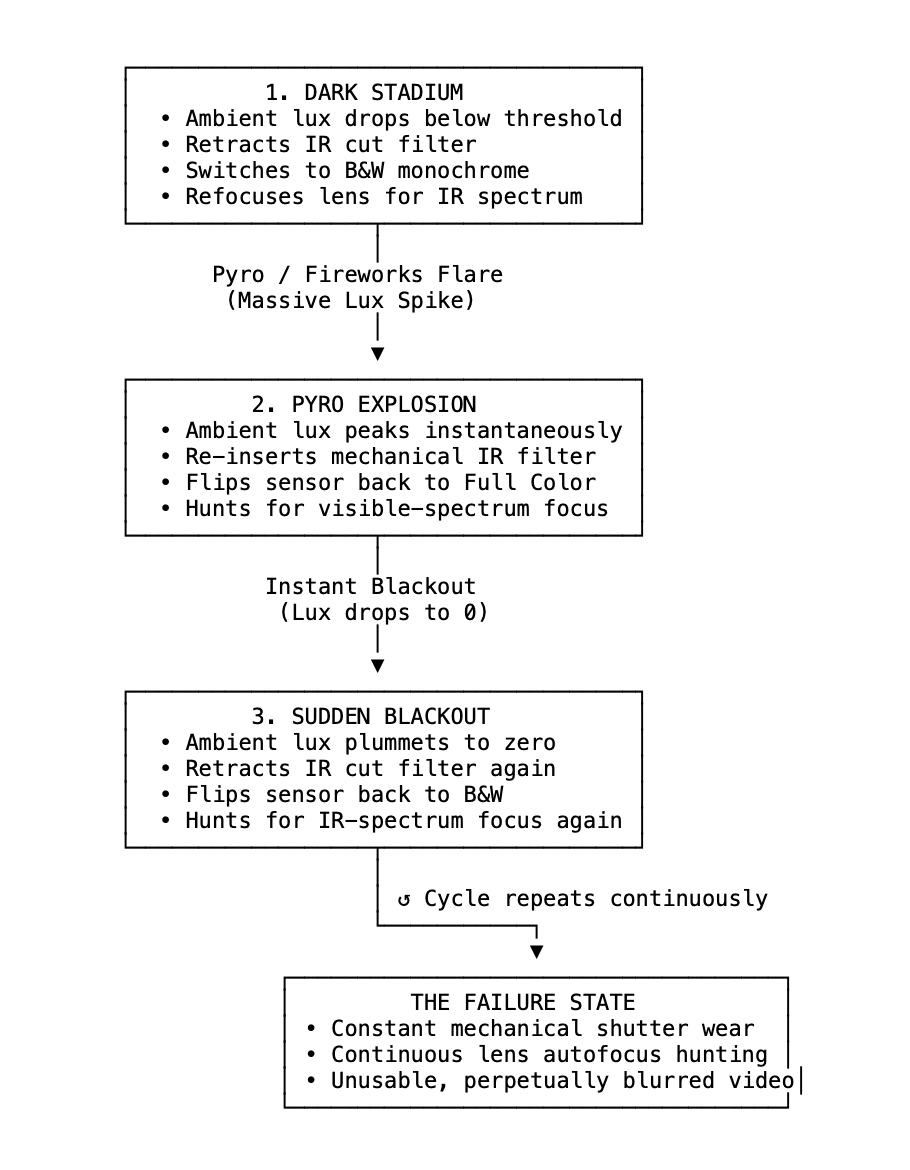
During a concert, this cycle was happening continuously. The camera was mechanically and computationally thrashing – clicking its mechanical filter back and forth, jumping between color and black-and-white, and constantly running its autofocus motor to compensate for changing wavelengths. The resulting footage was completely unusable.
The fix: Forcefully disabling night mode
Built-in IR LEDs in Verkada PTZ cameras are designed to illuminate objects roughly 100 meters away. At stadium distances, that wasn’t significantly helping, so we pushed a configuration that completely disabled night mode and locked the cameras into day (color) mode.
By keeping the mechanical IR cut filter pinned in place, the camera stopped thrashing, the autofocus stayed locked onto the stands without constantly hunting across light spectrum shifts, and the camera’s High Dynamic Range (HDR) sensor relied entirely on the venue's existing ambient stage and stadium lighting.
The result was stable, continuous, color video throughout the entire show, even during heavy strobe and pyrotechnic sequences.
Problem 3: Blown-out auto-exposure
The last issue was a relatively simple fix. Because the stadium is partially open-canopy, corner cameras face wildly different lighting conditions – from open sky to massive LED ribbon boards to shaded lower decks.
By default, an auto-exposure algorithm meters the whole frame. When the camera saw the blast of light from the LED ribbon boards and jumbotrons, it correctly stopped down the exposure to prevent the bright LEDs from clipping. The problem is that the seating areas directly underneath the ribbon boards were plunged into darkness. The SOC operators couldn't make out rows, let alone faces.
We could have simply repositioned the camera away from the ribbon boards, but moving the corner cameras would have sacrificed cross-stadium sightlines, which the SOC team was not willing to do.
Instead, we manually tuned the exposure compensation curves and metering zones for each corner quadrant, telling the camera processor to ignore the blown-out highlights from the LED ribbon boards and open sky. While the ribbon boards ended up overexposed, the seating rows became visible, balanced, and sharp.
Lessons from the field
When you deploy hardware at this scale, edge cases are bound to happen. When standard admin settings couldn't solve the issues this customer was seeing, our Support team flew out to the stadium, embedded directly in the SOC, and worked side-by-side with our engineering teams to build and roll out the right fixes.
Solving tough security problems means showing up on the ground and doing the work to get it right, so our customers can continue to trust us with their most demanding environments.


