Cloud vs. Hybrid Cloud Security Camera Systems: How Cloud Video Storage Works
Cloud video storage uses remote data centers to record and retain security camera footage instead of on-premises servers or network video recorders, helping to eliminate on-site infrastructure requirements. Hybrid cloud systems store footage both locally on cameras or edge devices and remotely in cloud storage, providing redundancy intended to maintain recording continuity if the primary internet connection is interrupted. Cloud-based deployments can offer scalability and automatic updates, while hybrid approaches can combine remote benefits with local resilience.
How does cloud video storage work for security cameras?
Cloud video storage begins when a camera captures footage and applies video compression algorithms. The compressed stream travels across the facility network to cloud-based recording systems to verify integrity, and write data to storage arrays. Authorized users access recordings through web interfaces or mobile applications, and may be able to retrieve footage by date, time, or search criteria.
How footage moves from camera to cloud
Cameras with built-in cloud connectivity have integrated client software managing cloud communication. Network video recorders with cloud integration upload stored footage to cloud backends. Edge devices handle connectivity from non-cloud-aware cameras.
Footage transmission generally uses either continuous streaming or scheduled uploads. Continuous streaming can facilitate immediate remote viewing; scheduled uploads occur at off-peak hours, reducing bandwidth during business operations. Most cloud video systems use adaptive bitrate technology, adjusting video quality based on available bandwidth.
Encryption and data security
Footage encryption occurs at multiple stages. Transport layer encryption using TLS (Transport Layer Security) 1.2 or higher helps protect data as it travels from camera to cloud infrastructure. Server-side encryption helps protect stored footage using AES-256 encryption or equivalent standards.
Authentication mechanisms can also help protect access to stored recordings. For example, multi-factor authentication requires users to provide multiple credentials, and role-based access control capabilities can help organizations limit individual user permissions to specific cameras, recordings, or facilities.
What is the difference between cloud and hybrid cloud security systems?
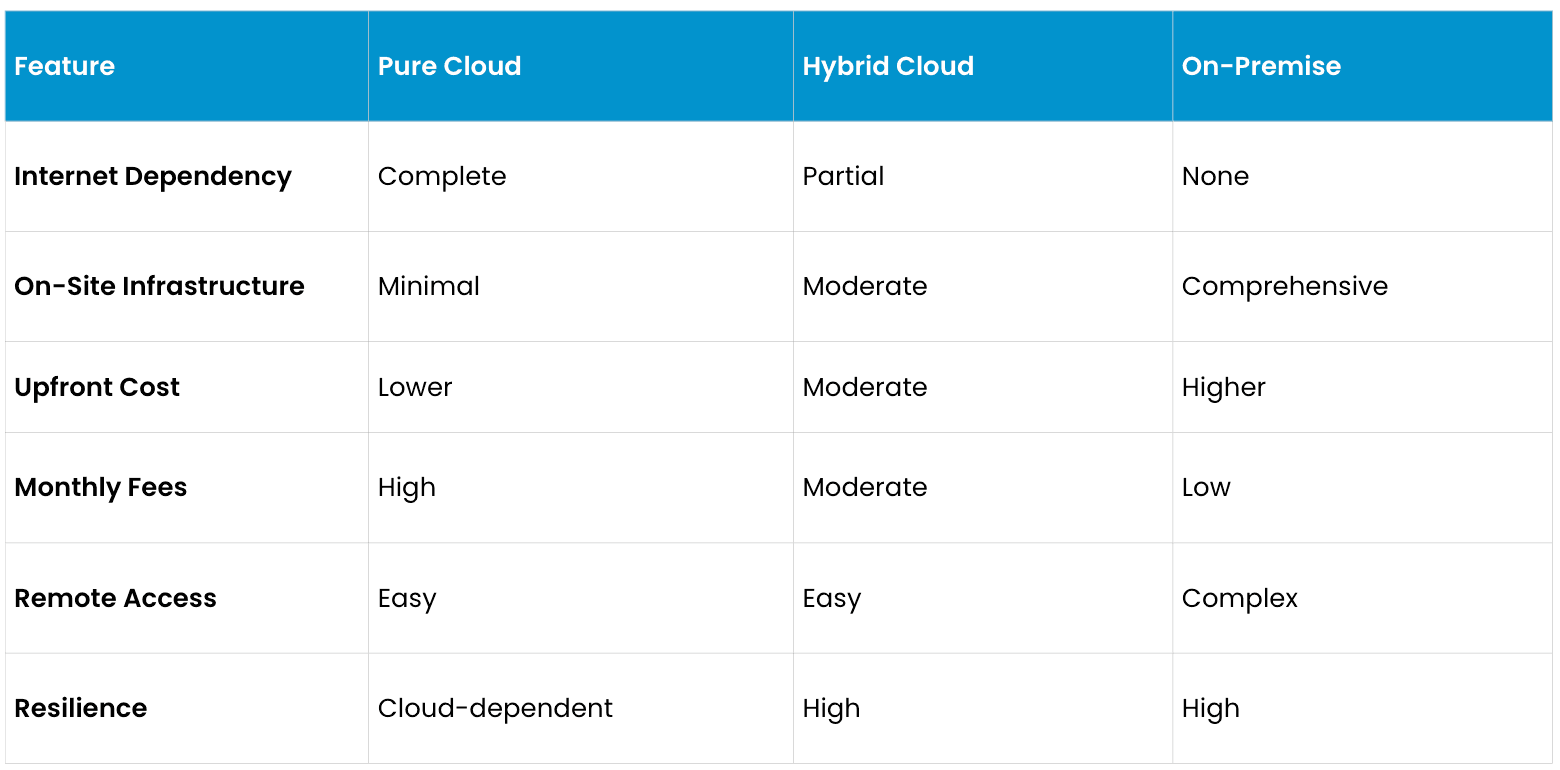
These three approaches represent distinct architectural choices with different operational characteristics.
Pure cloud: all footage stored remotely
Pure cloud systems eliminate on-premises storage infrastructure entirely. Cameras transmit footage continuously to cloud backends where all recording occurs. Users access footage remotely through cloud interfaces.
Pure cloud advantages may include minimal on-site infrastructure, automatic scaling to accommodate growing camera deployments, and simplified system administration. Cloud providers manage storage capacity, redundancy, and backup operations.
Pure cloud disadvantages may include complete dependence on internet connectivity — footage records only when internet is available. Cloud service fees can also accumulate monthly, making long-term costs potentially high for large deployments.
Hybrid cloud: local recording with cloud backup
Hybrid cloud systems record footage locally on cameras, edge devices, or on-premises NVRs while simultaneously uploading to cloud backup. This dual recording helps support continuous availability even if internet connectivity fails.
Hybrid cloud advantages may include resilience to internet outages, faster local access to recent footage, and reduced internet bandwidth requirements. Hybrid cloud disadvantages may include higher upfront infrastructure costs and more complex system administration.
On-premise only
Traditional on-premises systems store all footage locally without cloud integration. Users access recordings through local network interfaces or require VPN tunnels for remote viewing.
Advantages may include independence from cloud providers, potentially lower long-term costs for large deployments, and maximum privacy control. Disadvantages may include substantial upfront hardware investment, ongoing maintenance responsibility, and limited scalability.
Benefits of cloud-based video storage
No on-site server maintenance
Cloud systems minimize the burden of maintaining on-premises recording infrastructure. Cloud providers maintain redundant hardware, automatically scaling capacity as recording needs grow. This operational simplification is especially valuable for facilities lacking dedicated IT staff.
Automatic firmware updates and patches
Cloud recording systems can automatically receive firmware updates and security patches from providers without facility involvement. This continuous improvement cycle can help systems remain current with security standards.
Scalable storage without hardware upgrades
Cloud storage can generally scale on-demand without requiring the purchase of additional hardware.
Remote access from any supported device
Cloud systems generally enable authorized users to access recordings on supported devices–including mobile applications on modern cell phones–from anywhere with internet connectivity. This capability can help security personnel investigate incidents immediately, even when not onsite.
Concerns with cloud video storage
Bandwidth requirements
Cloud video systems require substantial and continuous internet bandwidth. A four-camera facility transmitting standard-definition video continuously might require 10 to 20 megabits per second of reliable connectivity. Organizations dependent on cloud recording without redundant internet connections may risk data loss if primary connectivity fails.
Data sovereignty and compliance
Cloud storage in remote data centers may create data sovereignty concerns for some regulated industries. Healthcare facilities subject to HIPAA and government facilities may face restrictions on storing monitoring footage on third-party infrastructure. International data protection regulations like GDPR can create complex requirements for cross-border storage.
Frequently asked questions
Can I access cloud video storage without internet?
Cloud storage generally requires an active connection to move data off-site. However, hybrid cloud systems can help solve the "outage gap" by recording to local onboard storage during an internet outage. Once the internet returns, the system may automatically sync that footage to the cloud so no history is lost. Note that while recording is continuous on device, you generally need an internet connection to log into the management platform and view the video.
Is cloud video storage secure?
Quality cloud video providers implement robust security including encryption in transit and at rest, multi-factor authentication, and regular security audits. Organizations may want to evaluate provider security certifications and compliance standards before purchase.
What happens to my footage if the cloud provider closes?
Most cloud providers contractually guarantee data portability if service terminates. Users may have specified periods (typically 30 to 90 days) to retrieve archived footage before deletion.
Can cloud video be hacked?
Cloud storage encryption, authentication, and access control can help prevent unauthorized access when properly configured, but nothing is bulletproof. Weak passwords and phishing attacks remain risks. Strong authentication and minimal access permissions can help mitigate threats.
Does cloud storage support playback at different speeds?
Quality cloud systems support variable playback speeds including time-lapse and reverse playback. Specific capabilities depend on provider features.
Can I search cloud video by specific events?
Advanced cloud systems often support event-based search including motion detection, person detection, and line-crossing alerts. This capability transforms footage from time-based access to intelligent search.
How do I migrate from on-premises to cloud storage?
Migration typically involves parallel operation of both systems until historical footage is transferred.
This content is provided for informational and educational purposes only on an "as-is" basis. The views expressed herein may include speculative claims, represent the opinions of the authors, and do not necessarily reflect the official product specifications or technical capabilities of Verkada products. Verkada makes no guarantees regarding the accuracy, completeness, or timeliness of this content, which may not reflect current legal or industry developments. This post does not constitute legal, technical, or professional advice; any reliance you place on this information is at your own risk. Verkada hereby disclaims all liability for any loss or damage arising from reliance on this content. Readers are solely responsible for their own regulatory compliance and should consult with qualified specialists regarding their specific security and legal requirements.
