An Internet Protocol (IP) camera is a digital video camera that transmits and receives footage over an IP network using Ethernet or wireless connectivity. Unlike analog CCTV systems, IP cameras send compressed digital video signals to a network video recorder (NVR) or cloud storage, enabling remote access and advanced analytics on a standard computer network.
What is an IP camera and how does it work?
IP cameras function as standalone intelligent devices on networks, each with unique IP addresses. They digitize footage, compress using video codecs (H.264, H.265), and transmit over local area networks (LAN) or internet to NVRs, cloud platforms, or connected devices. Cameras capture in real time, processors compress signals, data travels through Ethernet or Wi-Fi, authorized users access footage remotely or locally.
IP cameras use TCP/IP protocol suite for transmission — the same standard as email and web. Most modern systems use Power over Ethernet (PoE), sending power and data through single twisted-pair cables, eliminating separate power supplies. NVRs or PoE switches supply power to multiple cameras. Some cameras connect via Wi-Fi, though Ethernet provides more reliable performance and higher bandwidth.
IP vs. analog cameras
IP cameras usually offer 2-50 megapixels resolution versus analog's 0.4 megapixels, capturing fine details (readable text, identifiable faces, license plates). IP systems can support advanced features (motion-triggered recording, facial recognition, people counting, object detection) built into cameras. Modern IP deployments are cost-competitive with superior image quality and reduced maintenance. IP distributes workload across networks and leverages cloud storage; analog requires dedicated DVR recording drives.
Advantages of IP cameras
Higher resolution: Digital transmission and megapixel sensors enable 4K, 8MP, 16MP forensic-quality video with larger field-of-view coverage and exceptional investigative detail. Facial features remain identifiable; vehicle license plates become reliably readable.
Remote access and cloud storage: Internet connectivity enables authorized viewing from anywhere on any device. Cloud storage provides automatic backup eliminating physical DVR dependence. Multiple users access simultaneously for collaborative operations.
Power over Ethernet: PoE supplies power and connectivity through one Ethernet cable, eliminating separate power lines and voltage converters. Cat5e or Cat6 cables carry both signals up to 330 feet, simplifying deployment across expansive buildings.
Advanced analytics and AI: Support real-time analytics with person detection, vehicle recognition, loitering alerts, crowd density monitoring, intrusion detection. Machine learning identifies behaviors and objects impossible for analog systems, enabling proactive responses.
What are the different types of IP cameras?
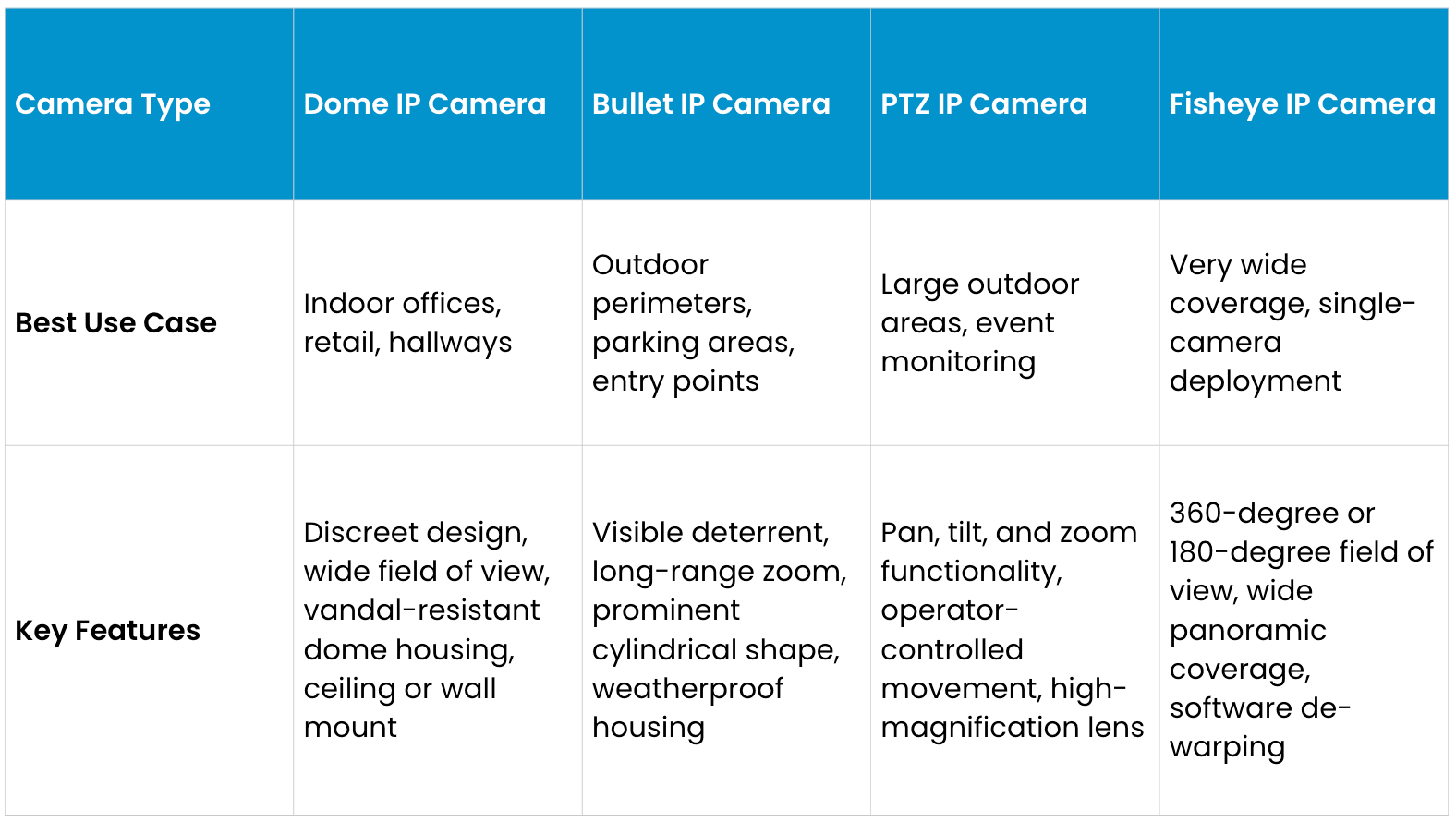
Dome cameras are typically the standard choice for professional deployments due to their balanced performance, aesthetic design, and vandal resistance. Bullet cameras excel in outdoor applications where visible deterrence matters and long-range monitoring is required. PTZ cameras provide flexibility for large areas but require higher bandwidth and skilled operators. Fisheye models are ideal when a single camera must cover an exceptionally large area such as a warehouse floor or parking garage.
How to choose the right IP camera
Resolution: General security monitoring requires 2MP (1920x1080) or 4MP cameras. Facial recognition, license plate reading, or forensic evidence require 8MP+. At 10 feet, 2MP suffices; at 50+ feet, 4MP-8MP maintains identifying detail. Modern sensors are affordable, with incremental costs justifying investigative benefits.
Indoor vs. outdoor: Outdoor cameras often require IP67 or IP68 ratings (dust and water resistance). Vandal-prone areas need dome housings with IK10+ impact ratings.
Storage: On-site NVRs provide control without the internet, appealing for unreliable connections or strict data policies. Cloud storage helps enable anywhere access and automatic backup, often with ongoing fees. Hybrid approaches store locally for rapid retrieval and backup to cloud for redundancy. Consider bandwidth — HD and 4K cameras generate substantial data transfer requirements.
Frequently asked questions
How much bandwidth does an IP camera use?
A 4MP camera streams 4-6 Mbps (compression/frame-rate dependent). 8MP cameras use 8-12 Mbps. Most modern infrastructure handles multiple cameras; audit available bandwidth before large deployments.
Can IP cameras work without internet?
Yes. Cameras function on local area networks (LANs) without internet. They record to on-site NVRs continuously with local computer access. Internet enables remote access and cloud backup but isn't required.
What is the difference between PoE and Wi-Fi cameras?
PoE cameras receive power and data through one Ethernet cable, providing stable, high-bandwidth connections for stationary installations. Wi-Fi cameras install easily where cabling is difficult but experience interference and higher power consumption, requiring battery backup or outlets.
Can IP cameras be hacked?
Like all network devices, they present cybersecurity considerations. Secure deployments use strong passwords, regular firmware updates, network segmentation, and encryption. Closed networks without internet exposure face minimal risk. Internet-connected systems should follow enterprise practices (VPN tunneling, firewalls).
Do IP cameras require subscriptions?
Cameras themselves don't require subscriptions. Local storage on NVRs is free. Cloud storage and advanced analytics often involve fees, but basic functionality operates independently.
This content is provided for informational and educational purposes only on an "as-is" basis. The views expressed herein may include speculative claims, represent the opinions of the authors, and do not necessarily reflect the official product specifications or technical capabilities of Verkada products. Verkada makes no guarantees regarding the accuracy, completeness, or timeliness of this content, which may not reflect current legal or industry developments. This post does not constitute legal, technical, or professional advice; any reliance you place on this information is at your own risk. Verkada hereby disclaims all liability for any loss or damage arising from reliance on this content. Readers are solely responsible for their own regulatory compliance and should consult with qualified specialists regarding their specific security and legal requirements.
