A digital video recorder (DVR) is an electronic device that captures video from analog security cameras, converts it to digital format, compresses it, and stores it on a hard drive for recording and playback. DVRs have been the foundation of security systems for decades, connecting multiple analog cameras to a single recording hub. They enable continuous or motion-triggered recording with time-stamped playback capabilities.
What is a DVR and how does it work?
DVRs capture analog camera signals through coaxial cables and perform continuous conversion to digital format, compression for storage efficiency, and recording to hard drives. Built-in compression using H.264 and H.265 codecs is essential — uncompressed 1080p video fills terabytes daily. Compression enables weeks or months of storage on modest drives.
DVRs contain a microprocessor, video capture cards, hard drives (1TB-16TB), power supply, and motherboard. Coaxial cables connect analog cameras; network cables enable remote access. An analog-to-digital converter (ADC) samples signals at regular intervals (typically 30fps). Compression algorithms identify redundancy between frames — 99% of static scene pixels remain unchanged — recording only differences. This processed video writes to hard drives using "circular recording," automatically overwriting the oldest footage when the disk reaches capacity.
What types of DVR systems are available?
Standalone DVRs are dedicated hardware devices connecting directly to analog cameras, monitors, and networks. They're simple to install, require minimal expertise, and operate reliably. They support 4-32 camera inputs with intuitive interfaces and built-in backup for evidence preservation. Most common in small to medium installations.
PC-based DVRs install DVR software on existing Windows or Linux servers, offering flexibility and easier updates. However, system failure takes entire monitoring offline and creates malware vulnerability if connected to the internet without proper security. Less common in professional installations.
Hybrid DVRs combine analog and IP camera support, allowing gradual migration from analog to digital systems. They manage 8-64 mixed channels but represent transitional technology. As organizations complete IP migrations, hybrids become less relevant. Most professionals recommend moving directly to all-IP systems with NVRs.
DVR vs. NVR vs. cloud: which recording method is best?
The choice between recording methods impacts storage, accessibility, scalability, and total cost of ownership for your security system.
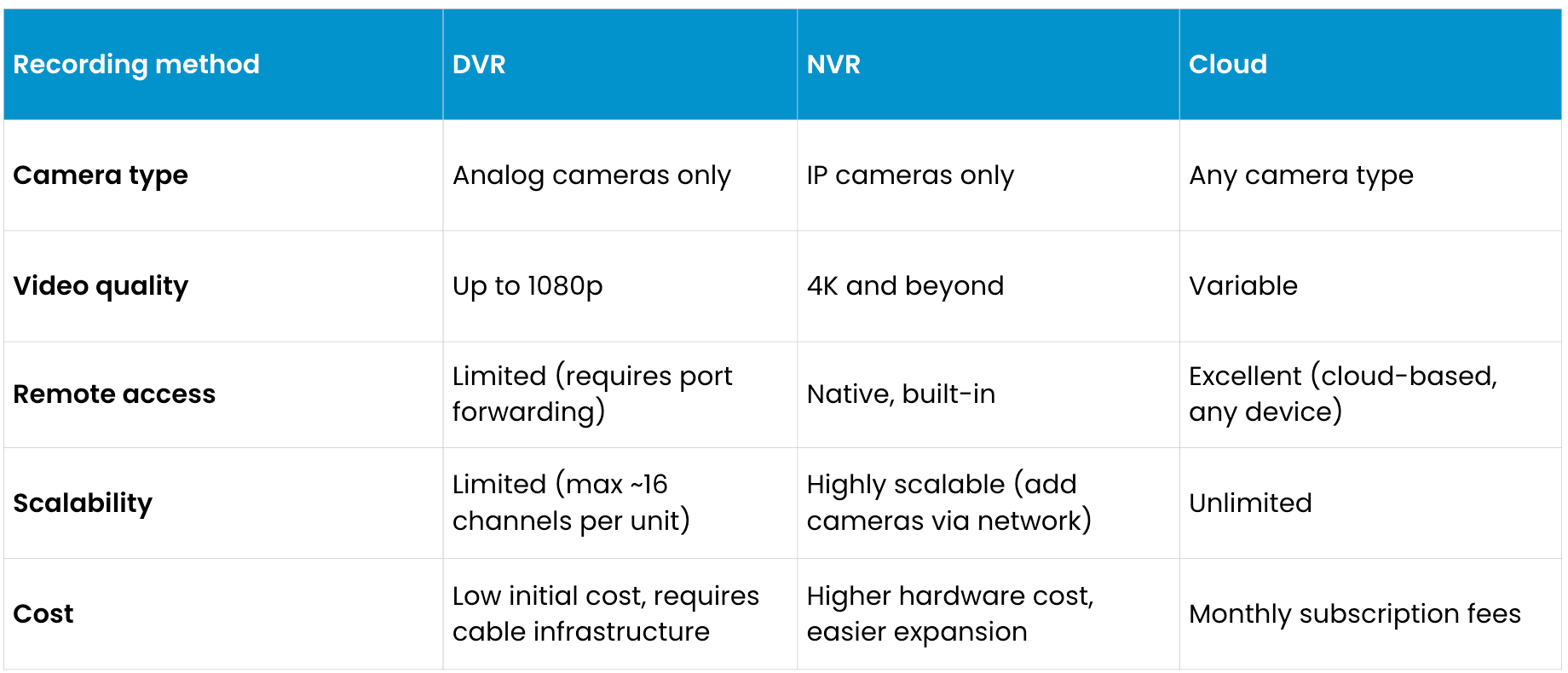
DVRs work exclusively with analog cameras, which limits video resolution to 1080p maximum. NVRs support digital IP cameras, delivering 4K resolution and advanced metadata extraction. Cloud systems store footage remotely, providing accessibility from anywhere but incurring ongoing subscription costs. Organizations with small, unchanging security requirements may prefer DVRs' low upfront costs. Growing businesses benefit from NVRs' scalability. Large enterprises or those with strict data residency requirements often choose cloud systems despite higher operational expenses.
What are the limitations of DVR systems?
Video quality: Analog cameras max at 1080p, while IP cameras deliver 4K-8K. Lower resolution makes facial details, license plates, and identifying features difficult at distance. Analog also struggles in low-light, producing grainy footage. Signals degrade over cable distance beyond a few hundred feet, requiring expensive cable boosters.
Scalability: Adding cameras requires new coaxial cables, input cards, and often larger units — significant installation work and expense. IP cameras scale using existing network infrastructure. DVRs become impractical beyond 16-32 channels, unsuitable for large deployments.
Remote access: DVRs lack native remote access, requiring complex network configuration, port forwarding, and dynamic DNS — all security risks. Access is often slow and unreliable. Modern NVRs and cloud systems offer seamless mobile access with built-in security.
Are DVR systems still worth buying?
DVRs are worth considering for small retail stores (4-8 cameras) with limited budgets or existing extensive analog infrastructure to extend. Remote locations with unreliable internet may prefer DVR's local storage independence. However, for new security installations or 5+ year planning, IP-based NVRs offer superior value with better video quality, native remote access, easier scaling, and advanced analytics justifying higher initial investment. Cloud systems provide automated backups, unlimited storage, and AI-powered analysis.
Frequently asked questions
What is the difference between a DVR and an NVR?
DVRs work with analog cameras using coaxial cabling and local hard drive storage. NVRs work exclusively with IP cameras transmitting over Ethernet. NVRs support 4K, offer better remote access, scale more easily, and integrate with analytics. Most new installations choose NVRs.
How long does a DVR store footage?
Storage generally depends on resolution, compression, and hard drive capacity. Circular recording overwrites oldest footage when full. Longer retention may require larger drives or hybrid local/cloud backup.
Can you view DVR footage remotely on a phone?
Modern DVRs may support mobile apps but require network configuration, often with speed/reliability issues. Older DVRs tend to lack mobile support. IP-based systems (NVRs/cloud) can provide significantly better mobile access. For remote viewing, organizations may choose NVRs or cloud systems.
Are DVR systems secure?
Local-only storage is physically secure if locked. Remote access versions are vulnerable without proper configuration. Default passwords, weak encryption, and lack of updates can create risks. Modern systems with regular patches, strong authentication, and audit logging tend to be safer.
What should I do with an old DVR system?
Organizations may be able to retire systems responsibly through manufacturer or local electronics recycling. Some donate to community organizations, and/or consider modern NVRs that often integrate with existing infrastructure.
This content is provided for informational and educational purposes only on an "as-is" basis. The views expressed herein may include speculative claims, represent the opinions of the authors, and do not necessarily reflect the official product specifications or technical capabilities of Verkada products. Verkada makes no guarantees regarding the accuracy, completeness, or timeliness of this content, which may not reflect current legal or industry developments. This post does not constitute legal, technical, or professional advice; any reliance you place on this information is at your own risk. Verkada hereby disclaims all liability for any loss or damage arising from reliance on this content. Readers are solely responsible for their own regulatory compliance and should consult with qualified specialists regarding their specific security and legal requirements.
