A door access control system is an electronic security solution that authenticates user identity and manages authorization to determine who can enter specific doors and when. Access control systems replace traditional locks and keys with digital credentials, centralized management software, and automated enforcement of access policies, providing security organizations with detailed audit trails and real-time control over physical facility entry.
What is a door access control system?
Door access control operates on two principles: authentication (verifying identity) and authorization (confirming permission for a specific door). Users present credentials to a reader, which transmits data to a controller that checks access policies and signals the lock to unlock if authorized. This replaces manual key distribution, enables instant access revocation, and generates audit logs of all entry events.
How electronic access control works
The standard workflow is: user presents credential, reader transmits data to controller, controller verifies authorization for that door at the current time, and if approved, sends an unlock signal. Every transaction is logged. Security managers can instantly revoke access by updating a user profile rather than changing physical locks.
Access control vs. traditional locks: key differences
Traditional locks require physical key distribution, create security gaps when keys are lost, and provide no audit trail. Electronic access control provides centralized policy enforcement, instant access changes, detailed logging, and multiple authentication methods. Access policies can be granular — specific users at specific times on specific doors. The tradeoff is that electronic systems require network infrastructure, power supply, and technical expertise.
What are the different types of door access control?
Access control systems support multiple credential types, each with different security characteristics, user experience, and operational requirements.
Keycard and key fob systems
Physical credentials store access information on magnetic stripe, RFID, or smart card technology. Card readers communicate wirelessly with RFID cards or require contact for other types.
Keycards are familiar to workers and suitable for large organizations. However, cards can be lost, stolen, or shared. RFID key fobs offer improved durability and are harder to duplicate.
Mobile credential and smartphone access
Mobile access control systems store credentials on smartphone applications. Users unlock doors by holding their phone near the reader or by tapping a notification.
Mobile credentials offer advantages: they cannot be lost without losing the phone itself, cannot be easily duplicated, and can be revoked instantly by the system. Mobile access is increasingly preferred because it is harder to compromise than physical credentials.
Hybrid approaches (cards plus mobile) provide backup access methods.
Biometric access control
Biometric systems authenticate identity using unique biological characteristics — fingerprints, iris scans, facial recognition, or hand geometry. These credentials cannot be lost or stolen.
Facial recognition uses cameras and AI algorithms to identify individuals. Facial recognition is seamless and fast but raises privacy considerations in certain jurisdictions.
Fingerprint systems require users to place their finger on a scanner and cannot be compromised by lost or stolen credentials. All biometric systems require enrollment.
PIN and keypad systems
Keypads require users to enter a PIN to unlock doors. They are inexpensive and function without complex infrastructure. The fundamental weakness is that PIN numbers can be shared.
Main components of an access control system
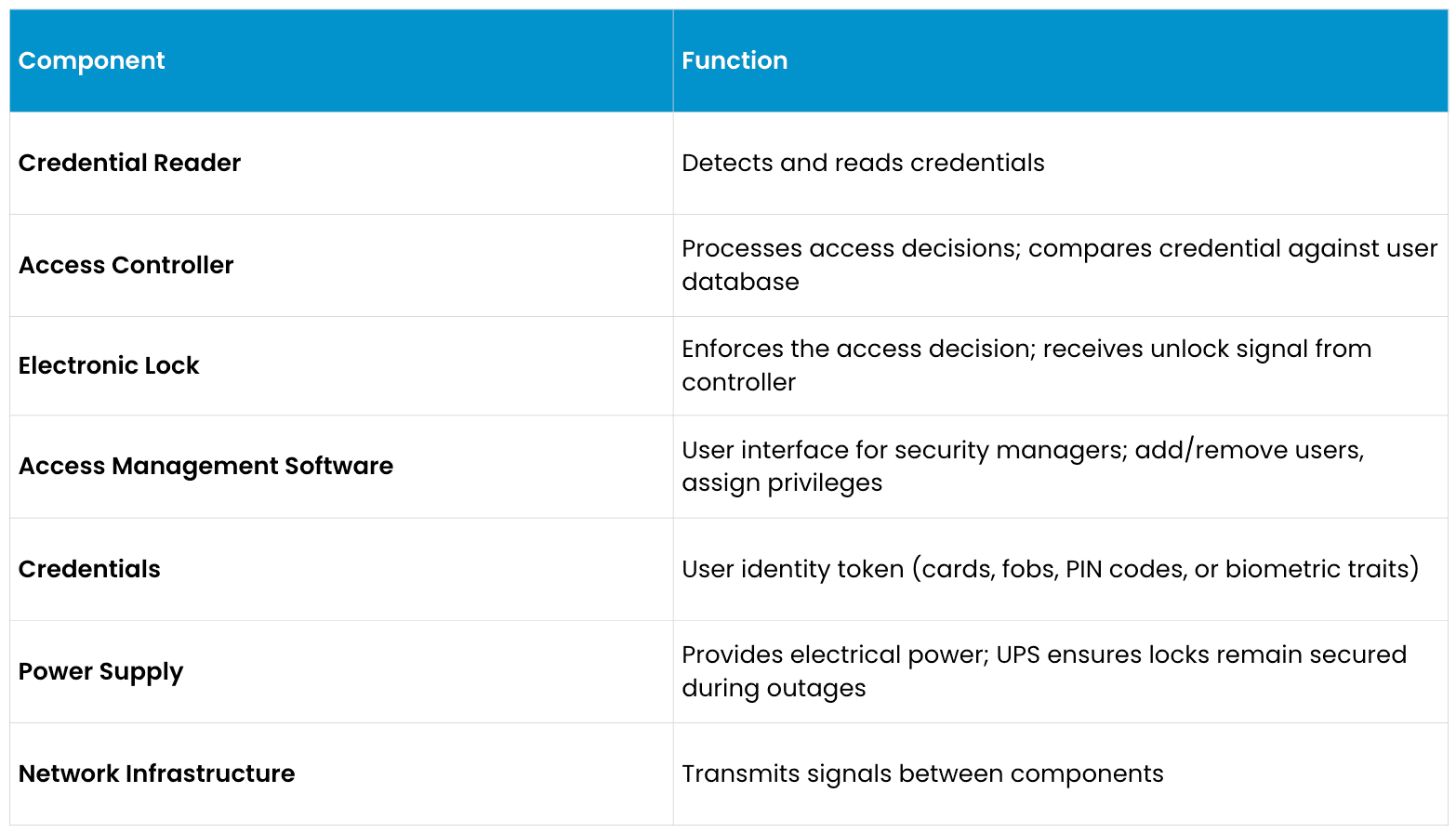
How to choose the right access control system
Selecting an appropriate access control solution requires assessing security requirements, budget constraints, facility complexity, and future scalability needs.
Cloud-based vs. on-premise
Cloud-based systems store user data on cloud servers, accessible from anywhere with internet connectivity. Cloud systems eliminate on-site server maintenance. The tradeoff is ongoing subscription fees and internet connectivity dependence.
On-premise systems store all data on local controllers or servers within the facility, eliminating cloud dependency. The downside is that on-site hardware failure requires local IT expertise.
Modern access control is trending toward cloud-based systems due to management simplicity. On-premise systems remain relevant for organizations with strict data residency requirements.
Integration with video monitoring
Access control and video monitoring are naturally complementary. When a user swipes a card or presents a credential, an integrated system can automatically clip and tag video from that moment. This integration helps enable investigators to instantly see video of the exact moment an access event occurred.
Scalability
An access control system should scale from initial deployment through future expansion. Evaluate whether the chosen system supports:
Adding unlimited users without license restrictions
Expanding to dozens or hundreds of doors using the same controller infrastructure
Multi-location management from a single software interface
API integration with other security systems
Cloud scalability for organizations with numerous sites
Proprietary systems create future constraints. Open standards-based systems provide vendor flexibility and prevent lock-in.
Compliance and audit trail requirements
Access control systems should generate audit trails meeting industry regulations. Healthcare, financial services, government, and utilities have specific requirements for access logging, retention periods, and proof of audit integrity.
Evaluate whether the system generates tamper-proof logs showing all access attempts (successful and failed), who made what changes to the system, and whether logs can be exported for compliance review.
Frequently asked questions
What happens to access control during a power outage?
Professional systems include battery backup (UPS) that maintains lock control for several hours during power loss. Modern cloud-based systems cache recent access decisions locally.
Can access control integrate with video monitoring?
Integration is recommended. Modern video management software natively integrates with access control systems.
What is the difference between access control and visitor management?
Access control manages authorized employee or resident access. Visitor management handles temporary guest access, typically issuing temporary credentials.
How secure is mobile credential access control?
Mobile credentials are generally more secure than physical cards. Mobile credentials generally cannot be compromised without access to the smartphone itself.
Can terminated employees access the facility if they don't return their card?
Depending on its configuration, professional systems often can immediately delete or deactivate the departed employee's credential in the system, disabling the card even if they retain it.
What is the cost difference between cloud and on-premise?
Cloud systems typically have lower upfront costs but higher ongoing subscription fees. On-premise systems generally have higher upfront costs but no recurring fees.
Can I use access control for areas beyond physical doors?
Access control systems can typically control electronic gates, bollards, parking barriers, computer workstations, and time and attendance tracking.
This content is provided for informational and educational purposes only on an "as-is" basis. The views expressed herein may include speculative claims, represent the opinions of the authors, and do not necessarily reflect the official product specifications or technical capabilities of Verkada products. Verkada makes no guarantees regarding the accuracy, completeness, or timeliness of this content, which may not reflect current legal or industry developments. This post does not constitute legal, technical, or professional advice; any reliance you place on this information is at your own risk. Verkada hereby disclaims all liability for any loss or damage arising from reliance on this content. Readers are solely responsible for their own regulatory compliance and should consult with qualified specialists regarding their specific security and legal requirements.
