Security camera systems encompass multiple form factors, transmission methods, and technologies for different monitoring applications. Primary types include dome, bullet, PTZ, and fisheye models, each optimized for specific installation environments. Understanding camera classification helps you select systems delivering appropriate coverage, image quality, and operational efficiency.
Professional security designers select appropriate types based on coverage requirements, environmental conditions, image quality, and operational constraints. Most comprehensive deployments use multiple camera types strategically positioned.
Camera form factors
Dome cameras feature protective spherical or low-profile housings providing superior vandal resistance and discrete appearance for covert monitoring in retail, offices, and professional settings. They mount on ceilings with wide field-of-view coverage (90-120 degrees), concealing direction to prevent observers from determining what is being watched.
Bullet cameras are distinctive elongated cylinders designed for visibility and long-distance optical performance. Excellent deterrents for parking lots and building perimeters, they excel at capturing detail across distances through concentrated optical designs. They mount externally on walls/poles with straightforward installation.
PTZ cameras combine motorized movement with variable optical zoom for dynamic operator control. Ideal for outdoor perimeter monitoring and large-area monitoring, they can read license plates 300 feet away but have motorized components requiring maintenance. They can only observe one direction at a time.
Fisheye cameras employ ultra-wide-angle lenses (180-360 degrees) with dewarping software correcting distortion. They excel in large interior spaces — retail, warehouses, manufacturing — with single-unit complete coverage and no mechanical components.
Technology: IP vs. analog cameras
Analog cameras transmit through coaxial cables to DVRs, which convert to digital format and compress locally. They max out at 1080p resolution, struggle with long cable runs, scalability, and remote access. Rarely specified for new systems.
IP cameras digitize internally and transmit as data packets over Ethernet networks, supporting 1080p-8K resolutions. They integrate with network infrastructure, scale easily by adding cameras, and provide native remote access, superior image quality, and video analytics. Nearly all professional installations specify IP cameras exclusively.
How to choose the right camera type
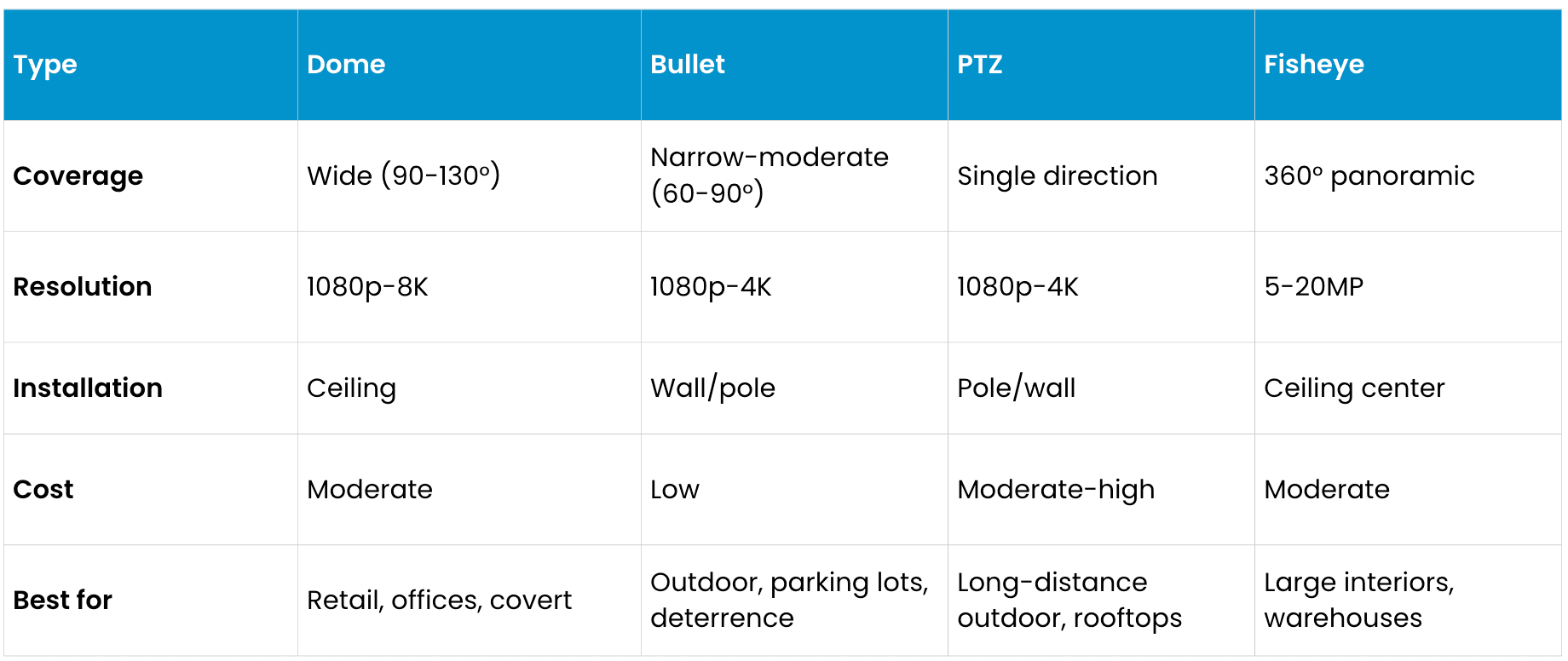
Coverage: Do you need one specific area (fixed) or track across large zones (fisheye/PTZ)?
Distance to subjects: Long-distance identification may favor bullets/PTZ. Moderate distances may favor domes. Indoor retail may favor fisheye.
Environment: Harsh outdoor weather needs weatherproof cameras. Protected outdoor works with domes. Interior spaces tend to use domes or fisheye.
Installation: Wall mounting may favor bullets. Ceiling favors domes/fisheye. Pole perimeter uses bullets/PTZ.
Scalability: IP camera networks scale easily; DVR approaches have physical limitations.
Operations: Real-time operator control needs PTZ. Comprehensive recording uses fixed fisheye or multiple fixed cameras.
Environmental ratings and connection methods
Weather ratings (IP): IP66 cameras withstand direct water jets and dust (rain, snow, dust storms, sprinkler spray). IP67 cameras endure water immersion up to 1 meter (flooding, marine environments, high-pressure washdowns). Indoor cameras need minimal weatherproofing. Always verify IP ratings match the installation environment.
Vandal resistance (IK): IK08 provides adequate accidental impact protection (5kg from 1.5m). IK10 provides maximum protection against intentional violence or extreme vandalism. Dome cameras inherently protect through housing; bullets benefit from higher IK ratings.
Connectivity: Wired cameras (Ethernet/coaxial) provide consistent, interference-free delivery with unlimited power — professional standard for permanent installations. Wireless cameras (WiFi/proprietary radio) offer simpler installation but face bandwidth constraints, interference, and battery limitations. Best for temporary monitoring or locations where cabling is impractical.
Frequently asked questions
Best for retail stores? Combine discrete domes for floor monitoring and loss prevention, bullets for parking lot perimeter, and fisheye for large sections. Configuration depends on store size and priorities.
Can you mix types? Yes. Modern NVRs support any combination simultaneously. One system manages all types through a single interface.
IP vs. analog? For new installations, choose IP cameras for superior quality, native remote access, easier scaling, and analytics. Analog appropriate only with existing infrastructure while upgrading.
What is IR? Infrared cameras use LED illuminators emitting invisible light detected by sensors for night vision in darkness. Most IP cameras include integrated IR. Range varies 30-100 feet depending on illuminator power.
Distinguish people from vehicles? Modern cameras with analytics classify motion types and detect behaviors (running, loitering, intrusions). Advanced VMS platforms can trigger specific alerts — person loitering in restricted areas but not vehicles passing through.
How many cameras are needed? Each camera covers approximately 1000-1500 sq ft effectively. A 10,000 sq ft retail store needs 6-10 cameras. Retail requires denser coverage than warehouses. Consult professional designers for facility-specific recommendations.
What is VMS? Video management software (VMS) records, stores, retrieves, and analyzes security video with live viewing, playback search, motion alerts, permission management, cloud storage, and AI analytics. VMS selection is as important as camera selection.
This content is provided for informational and educational purposes only on an "as-is" basis. The views expressed herein may include speculative claims, represent the opinions of the authors, and do not necessarily reflect the official product specifications or technical capabilities of Verkada products. Verkada makes no guarantees regarding the accuracy, completeness, or timeliness of this content, which may not reflect current legal or industry developments. This post does not constitute legal, technical, or professional advice; any reliance you place on this information is at your own risk. Verkada hereby disclaims all liability for any loss or damage arising from reliance on this content. Readers are solely responsible for their own regulatory compliance and should consult with qualified specialists regarding their specific security and legal requirements.
